Step 1
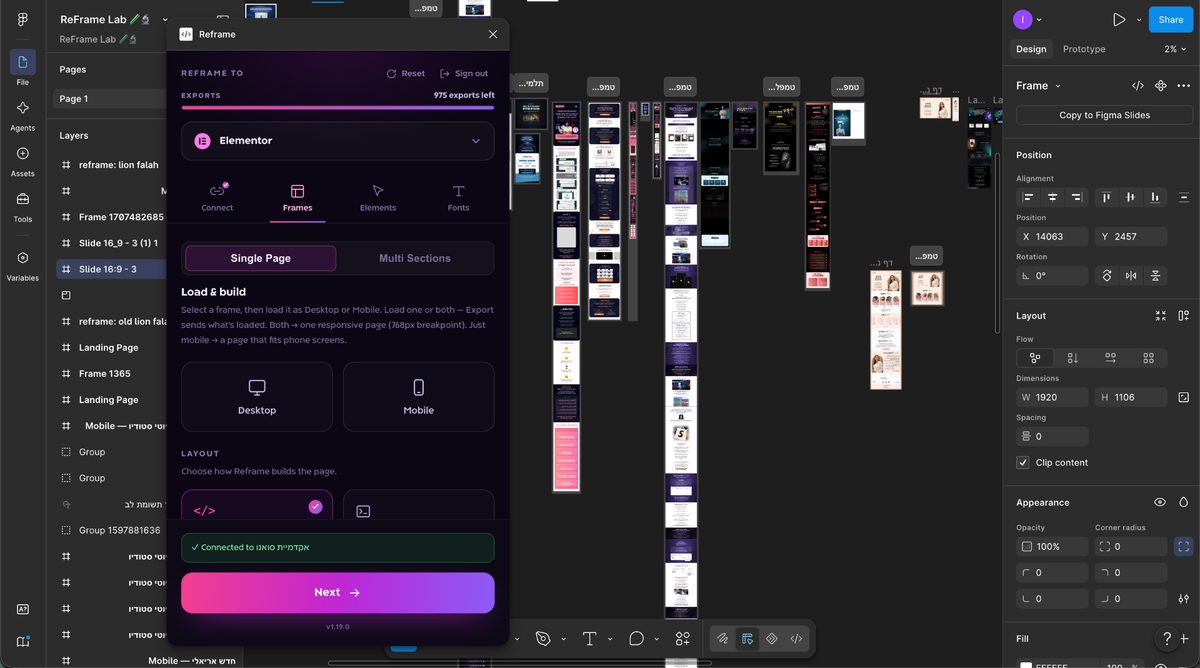
Load Your Frame
Open Figma and select the exact frame you want to build. ReFrame instantly scans your layout constraints, layers, and structure—setting up the engine for a zero-labor transition.




ReFrame automatically reads your design frames and generates responsive,
lightweight, and fully editable Elementor layouts with absolute precision.
How it works
Step 1
Open Figma and select the exact frame you want to build. ReFrame instantly scans your layout constraints, layers, and structure—setting up the engine for a zero-labor transition.
Step 2
Open the plugin inside Figma and quickly map your design structure. Tag your menus, buttons, and layouts to prime the asset engine for an absolute, glitch-free conversion.
Step 3
Open Figma and select the exact frame you want to build. ReFrame instantly scans your layout constraints, layers, and structure—setting up the engine for a zero-labor transition.
Simple plans that scale with you. Upgrade, downgrade, or cancel anytime.
Everything you need to turn Figma designs into live Elementor pages.
Start 7-day free trialFor studios and teams shipping multiple client projects.
Coming soonFor agencies and organizations with high-volume, custom needs.
Coming soon